Python Data Processing: Converting Between JSON, YAML, and Python Dictionaries 🐍🔁

Introduction
In the realm of Python data processing, understanding how to work with JSON, YAML, and Python dictionaries is essential. These formats enable seamless interchange and manipulation of data, making them fundamental tools for developers and DevOps engineers alike. This article explores the power of Python libraries such as json and pyyaml, demonstrating how to read and write data in JSON and YAML formats and how to harness Python dictionaries for data processing. 📚🚀
🔍 Python Power Pack: 10 Essential Libraries for Your Coding Journey 🚀
NumPy 🧮: NumPy is the fundamental library for scientific computing in Python, enabling efficient handling of large arrays and matrices, along with a comprehensive collection of mathematical functions to perform complex computations.
Pandas 🐼: Pandas provides a powerful toolkit for data manipulation and analysis, introducing DataFrames and Series, making it easy to clean, filter, aggregate, and analyze structured data.
Matplotlib 📈: Matplotlib is the go-to 2D plotting library, offering a wide range of visualization options to create informative and visually appealing charts, graphs, and plots.
SciPy 🔬: Built on NumPy, SciPy extends its capabilities by providing additional functionality for various scientific computing tasks, including optimization, integration, interpolation, signal processing, and more.
scikit-learn 🤖: scikit-learn is a leading machine learning library, packed with easy-to-use tools to build, train, and evaluate various machine learning models for classification, regression, clustering, and more.
TensorFlow 🧠: Developed by Google, TensorFlow is a popular deep learning library that allows you to build and train neural networks and deploy machine learning models at scale.
PyTorch 🔥: Known for its dynamic computation graph, PyTorch is another prominent deep learning library, widely used in research and industry for developing sophisticated neural networks.
OpenCV 🔍: OpenCV is a computer vision and image processing library, offering various tools and algorithms for tasks like image manipulation, object detection, and feature extraction.
Flask 🌐: Flask is a lightweight and minimalist web framework that allows you to build web applications with simplicity and flexibility, making it ideal for small to medium-sized projects.
Django 🚀: Django is a feature-rich web framework, known for its "batteries-included" approach, offering a comprehensive set of components and tools to build robust and scalable web applications rapidly.
🔧 Essential Python Tools: Navigating OS, YAML, JSON, and sys 🛠️
OS (os module) 🖥️: The os module in Python provides a way to interact with the operating system. DevOps engineers use it to perform tasks such as file and directory operations, process management, and environment variables handling. Whether it's navigating directories, checking file existence, or executing shell commands, the os module is a versatile tool in their arsenal.
YAML (PyYAML) 📄: YAML (YAML Ain't Markup Language) is a human-readable data serialization format. DevOps engineers utilize the PyYAML library to parse and generate YAML files, making configuration management and data interchange seamless. Whether configuring infrastructure or defining application settings, YAML simplifies complex structures into an easy-to-understand format.
JSON (json module) 📋: JSON (JavaScript Object Notation) is a widely used data interchange format. DevOps engineers often work with JSON files to exchange data between systems or configure applications. The built-in json module allows them to parse JSON data and convert it to Python objects, facilitating efficient data manipulation and transformation.
sys (sys module) 🧰: The sys module provides access to Python interpreter-specific functionalities. DevOps engineers leverage it for tasks like manipulating Python paths, interacting with the runtime environment, and handling command-line arguments. It gives them control over the behavior of the Python interpreter and allows them to fine-tune their scripts and applications.
DevOps engineers rely on these essential Python tools to seamlessly interact with the operating system, manage configurations, exchange data, and fine-tune their scripts for optimal performance and functionality.
Tasks:
1. Create a Dictionary in Python and write it to a json File.
import json

# Create a dictionary
data = {
    "name": "Kajal Biradar",
    "age": 23,
    "city": "Mumbai",
    "skills": ["Python", "DevOps", "AWS"]
}

# Define the file path
file_path = "data.json"

# Write the dictionary to a JSON file
with open(file_path, "w") as json_file:
    json.dump(data, json_file, indent=4)

print("Dictionary written to JSON file successfully!")
In this example, we import the json module, create a dictionary called data, and define the file path as "data.json". Then, we use the json.dump() function to write the contents of the dictionary to the specified JSON file.
2. Read a json file services.json kept in this folder and print the service names of every cloud service provider.
To read the services.json file and print the service names of every cloud service provider, you can use the following Python code:
import json

# Define the file path
file_path = "services.json"

# Read the JSON file
with open(file_path, "r") as json_file:
    data = json.load(json_file)

# Print the service names of every cloud service provider
for provider, service_data in data["services"].items():
    if provider != "debug":
        print(f"Cloud Service Provider: {provider.upper()}, Service Name: {service_data['name']}")
In this code:
We import the
jsonmodule to work with JSON data in Python.The
file_pathvariable stores the path to theservices.jsonfile.We use the
open()function to open the JSON file in read mode ("r").We use the
json.load()function to parse the JSON data from the file into a Python dictionary, which is stored in thedatavariable.The
forloop iterates through each item in the "services" dictionary.We check if the provider name is not equal to "debug" (as specified in the JSON data), to exclude the debug key.
If the provider is not "debug", we print the name of the cloud service provider (converted to uppercase) and its corresponding service name from the JSON data.
The code will print the service names of each cloud service provider present in the services.json file.
Output:

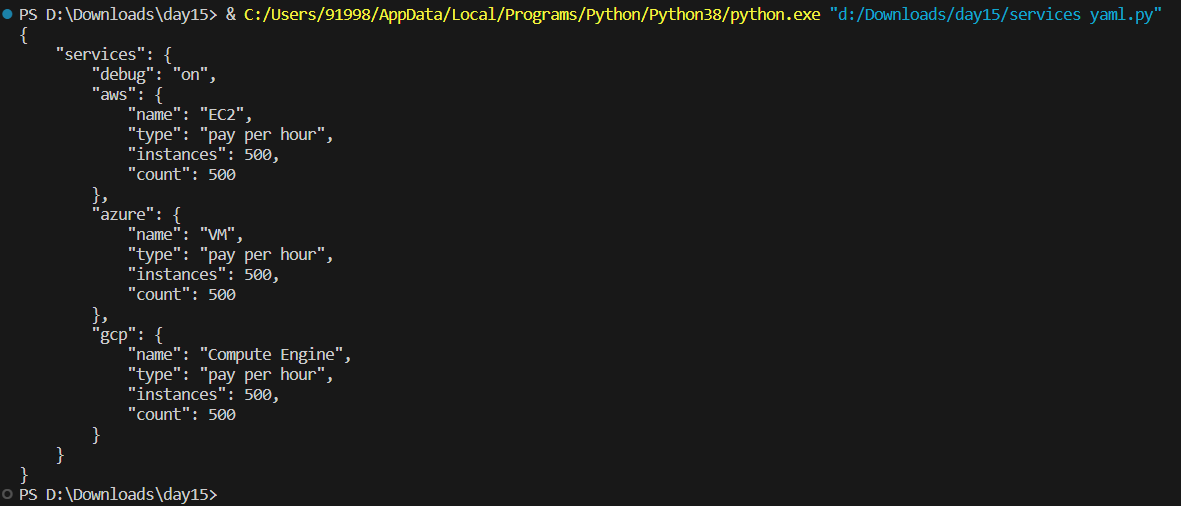
3. Read YAML file using python, file services.yaml and read the contents to convert yaml to json
To read a YAML file using Python and convert its contents to JSON, you can use the pyyaml library, which provides functionalities to work with YAML data. First, make sure you have installed the pyyaml library. If you haven't installed it yet, you can install it using pip:
pip install pyyaml
Once you have installed the pyyaml library, you can use the following Python code to read the services.yaml file and convert its contents to JSON:
import yaml
import json

# Define the file path
file_path = "services.yaml"

# Read the YAML file
with open(file_path, "r") as yaml_file:
    data = yaml.safe_load(yaml_file)

# Convert YAML data to JSON
json_data = json.dumps(data, indent=4)

# Print the JSON data
print(json_data)
In this code:
We import the
yamlandjsonmodules.We define the file path as
"services.yaml".We use the
yaml.safe_load()function to read the YAML file and load its contents into a Python dictionary.We then use
json.dumps()to convert the Python dictionary (data) to a JSON-formatted string, storing it in thejson_datavariable.Finally, we print the JSON data, which represents the contents of the original YAML file converted to JSON format.
Output:
Conclusion
Mastering the art of converting data between JSON, YAML, and Python dictionaries empowers Python developers and DevOps engineers to handle diverse data formats with ease. The versatility of libraries like json and pyyaml offers seamless interoperability, streamlining data exchange and processing tasks. Armed with this knowledge, programmers can efficiently handle data from various sources, making Python a powerful choice for data-centric applications and automation workflows. Embrace the flexibility of Python's data processing prowess to elevate your coding journey and unlock new possibilities for your projects. 🤝💻


